EQ
How to EQ drums
EQ a drum loop or a kit's bus in four moves: cut below 30 Hz, find the kit's box between 300 and 500 Hz and cut it, tame the hats' harshness with a dynamic band near 4 kHz, and add air last. The kick and the snare get their own pages; this is the beat as one sound.
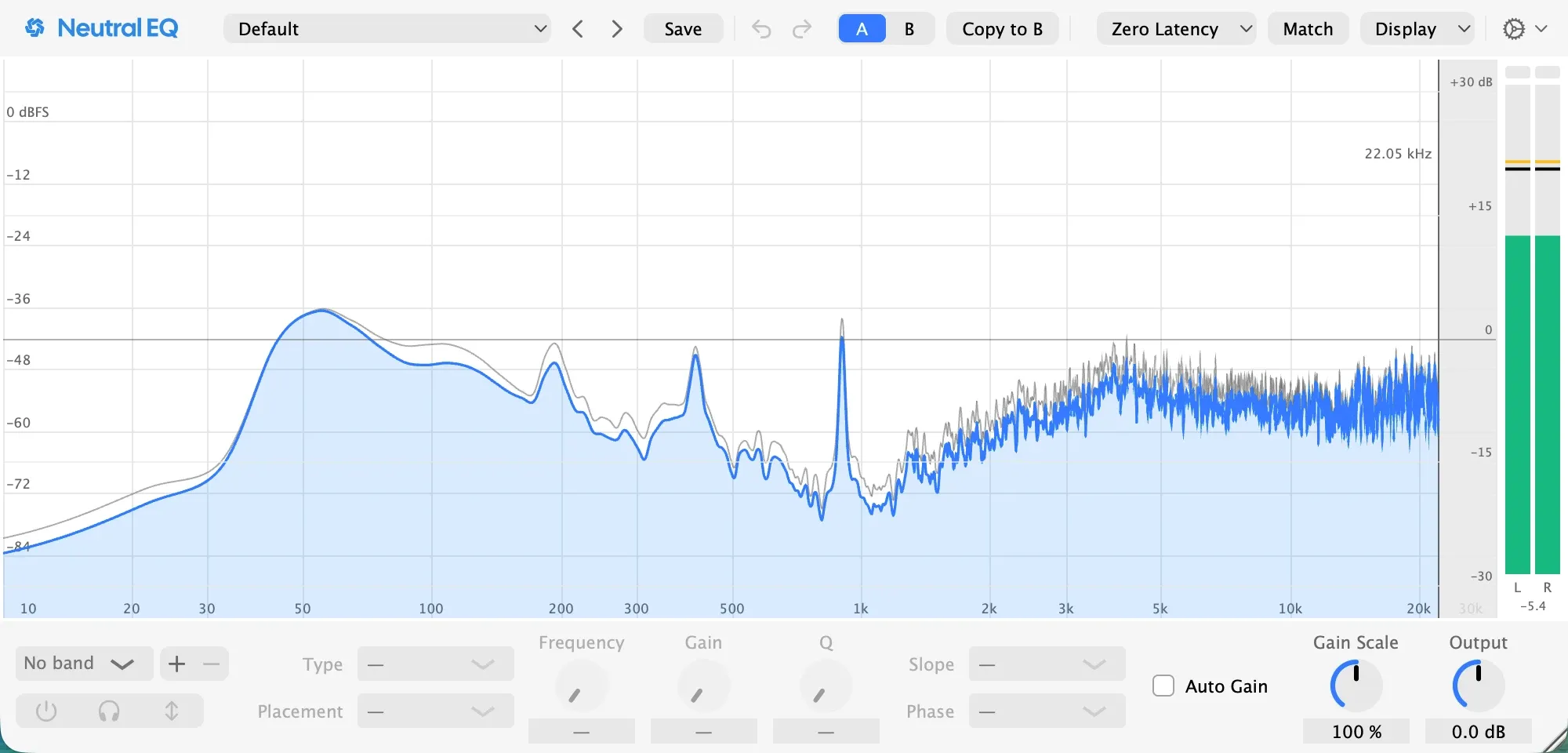
The beat as one sound
In a digital session the drums are often one sound: a loop from a pack, or a kit whose kick, snare and hats already sit on one bus. Then EQ is about the beat as a whole, and the four moves below are the ones that help a beat sit in a mix. The kick and the snare each have their own page for the day they are on their own tracks.
What you are hearing
A beat has four regions, and the picture above shows them. The kick’s weight is under 100 Hz. The box is 300 to 500 Hz, here near 400 Hz, where a kit sounds like cardboard and a loop brings its room along. The snare’s crack and the hats’ bite are 2 to 6 kHz, here with the hats turning harsh near 4 kHz. The sheen is above 8 kHz, the hats and the cymbals’ air.
1. Cut below the kick’s note
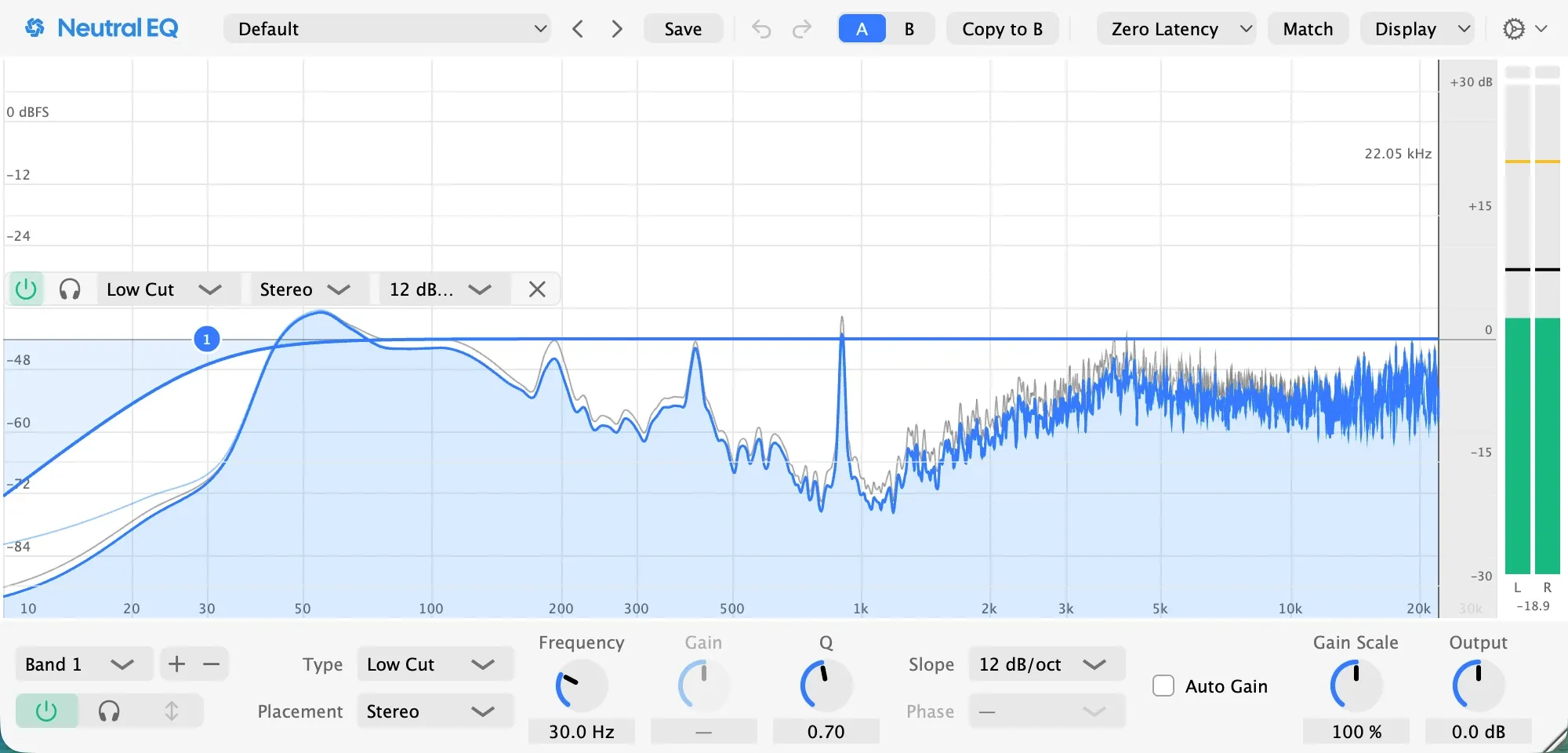
A low cut at 30 Hz with a gentle 12 dB per octave slope takes out what no speaker plays and keeps the kick whole. It sits at least an octave under the kick’s note, and on a beat whose kick is an 808, it stays off: a cut near the note bends the phase around it and softens the hit.
2. Find the box and cut it
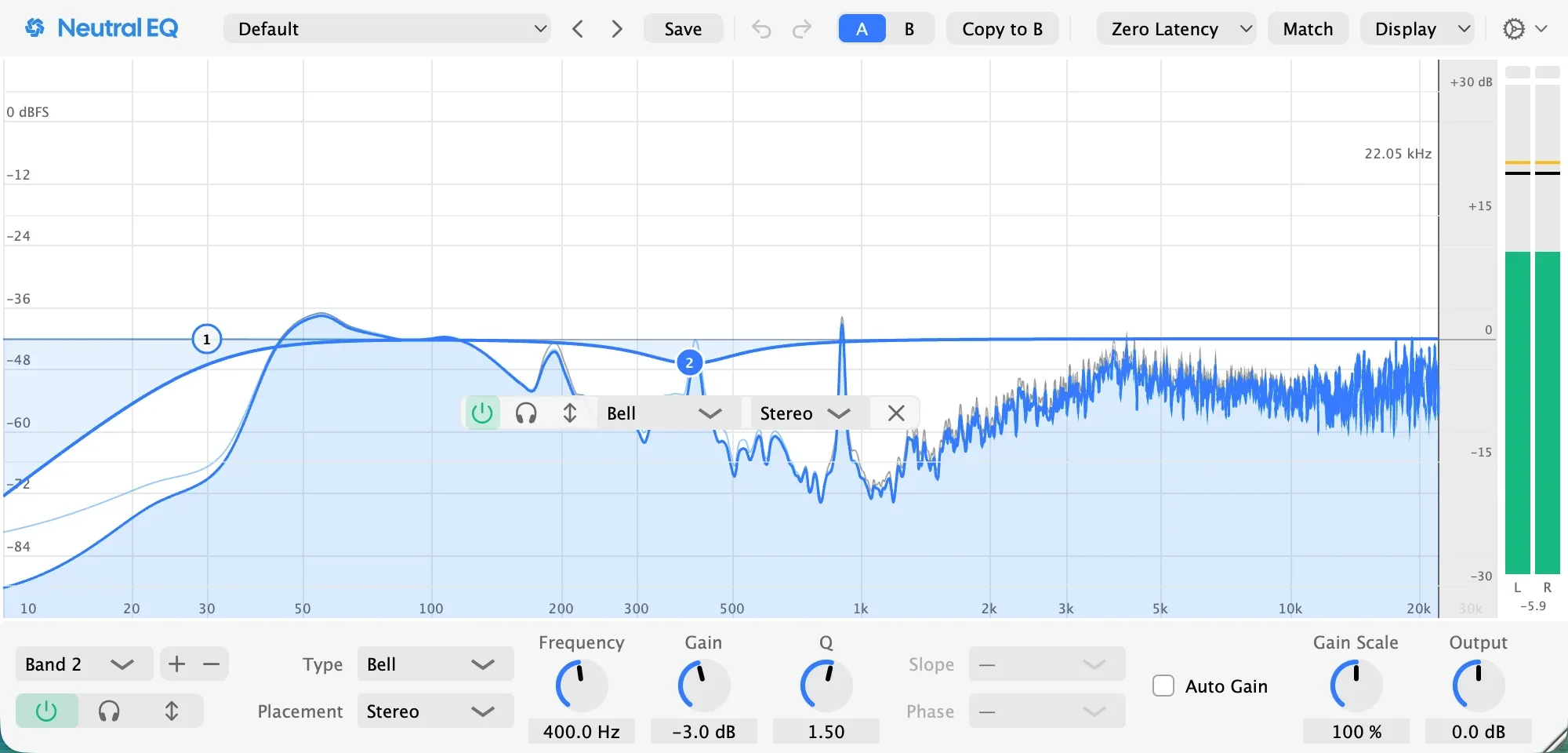
Sweep a narrow boost between 250 and 600 Hz while the beat plays with the bass. Where the kit turns to cardboard, stop; on this session it was 400 Hz. A cut of two to four decibels there, here three with a Q of 1.5, is the one move almost every loop needs, and it clears the range the bass and the pad want.
Pro tip: if the box shows only on the snare hits, make the cut dynamic, so the kick keeps its body between them.
3. Tame the hats only when they bite
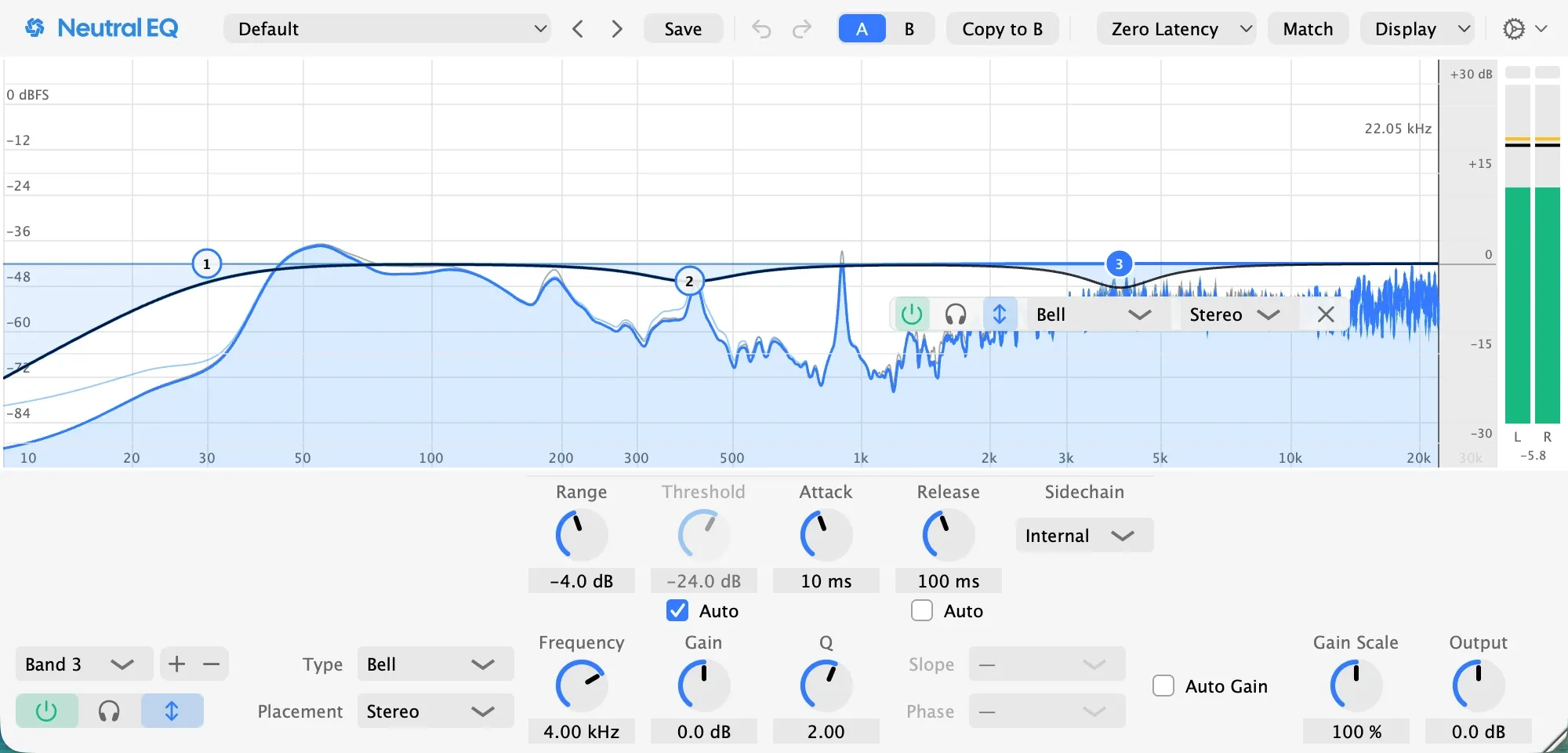
A static cut at 4 kHz dulls the snare to fix the hats. A dynamic band cuts only while the level crosses the threshold: a bell at 4 kHz with its gain at zero and a dynamic range of four decibels dips on the loud hats and returns between them, and the threshold sets itself to the beat’s level.
4. Add air last
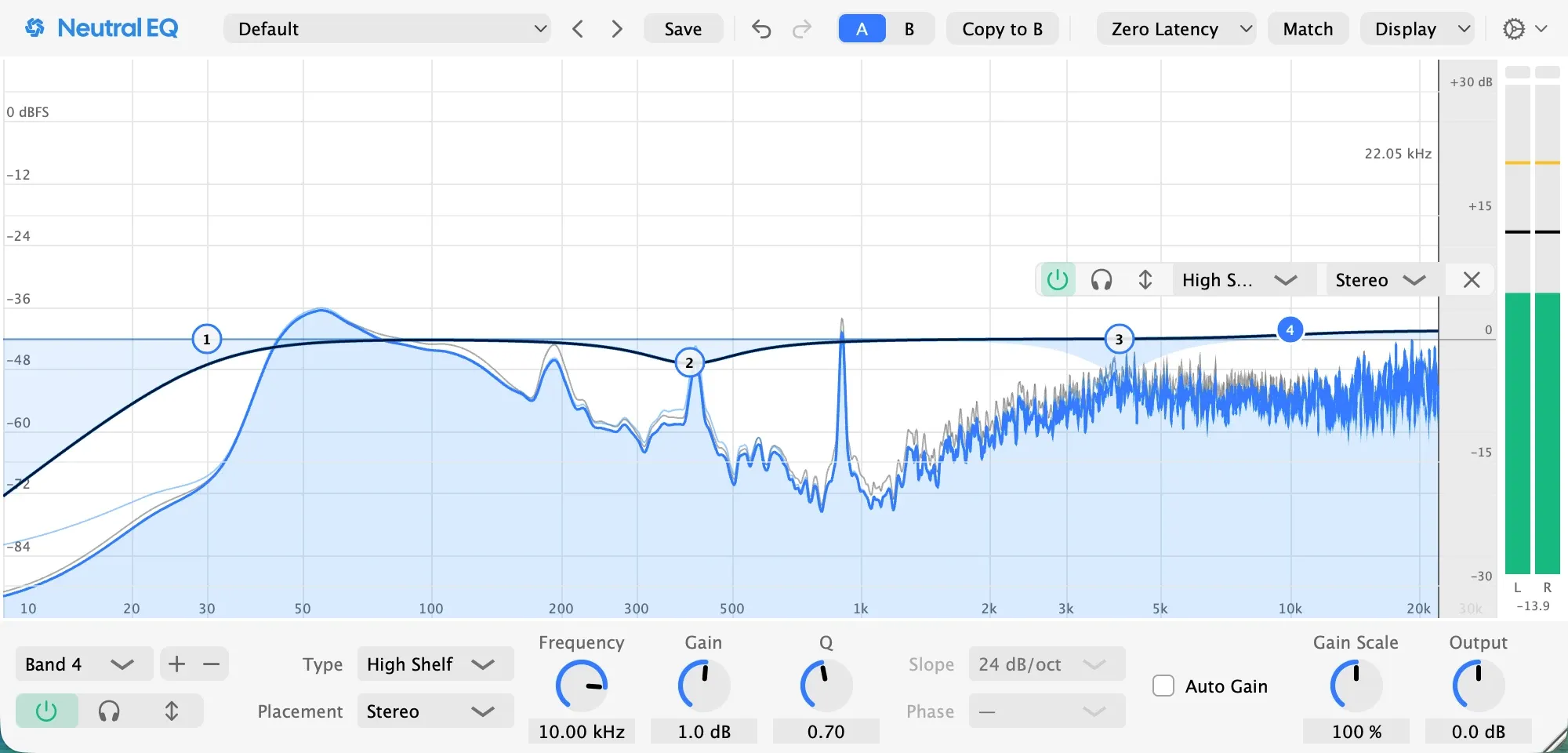
A high shelf of a decibel above 10 kHz brings back the sheen the box cut took with it. More than a decibel or two lifts the hats into the vocal’s way; a beat wants less air than a vocal.
Check it
Switch the EQ off and on with the whole song playing. The bass should be clearer with it on, the beat no smaller, the hats no sharper. If the beat sounds thin, step 2 is too deep; if the snare lost its crack, step 3 is too wide.
Pro tip: judge at matched level, with Auto Gain on, and by switching the band off in the full mix rather than soloing it.
If the kit was recorded with microphones
One microphone at a time, with the whole kit playing. The overheads are the picture of the kit and get the least: a low cut between 100 and 200 Hz and a cut where the cymbals turn harsh. The kick and the snare microphones get their own pages’ moves. Each tom gets a low cut under its note, a narrow cut on its ring and a lift at the note. The hat microphone gets a low cut near 300 Hz and the dynamic cut from step 3.
In Neutral EQ
The Drums folder holds this page’s starting points: Hi-Hat Tamer is step 3, and Cymbals Air is step 4. Load one, drag its band to where your beat bites, and the analyzer shows the beat under the curve. The presets page lists the folder with the kick and snare presets beside them.
Going further
Keep the low end mono. A widened loop turns to mush on a club system; the Low End Mono preset keeps the kick in the centre and leaves the hats wide.
The beat and the bass are one decision. The kick owns the lowest octave or the bass does; how to EQ bass shows the pocket that makes the two take turns.
A cheat sheet is a starting point, never a setting. Kick weight 50 to 100 Hz and click 3 to 5 kHz; snare body 150 to 250 Hz, ring 400 Hz to 1 kHz, crack 2 to 5 kHz; toms’ notes 80 to 200 Hz; hats’ bite 3 to 5 kHz and sheen above 10 kHz; the kit’s box 300 to 500 Hz. Every number is where to start the sweep, and the sweep says where to stop.
Questions people ask
How do I EQ hi-hats?
A low cut near 300 Hz takes the kick and the snare bleed out of a recorded hat and the thump out of a sampled one; a cut of two to four decibels where they turn harsh, usually between 3 and 5 kHz, found with a sweep and made dynamic so it acts only on the loud hits; and a shelf above 10 kHz only if the mix wants more sheen.
How do I EQ overheads?
Treat the overheads as the picture of the whole kit and EQ them least: a low cut between 100 and 200 Hz so the kick comes from its own microphone, a cut where the cymbals turn harsh near 4 kHz, and nothing else. If the overheads need more than that, move the microphones.
How do I EQ toms?
Each tom like a kick: a low cut just under its note, a narrow cut on its ring between 300 and 600 Hz found with a sweep, a lift of a decibel or two at the note for weight, and a lift near 4 kHz for the stick. A gate or a dynamic band on the ring keeps the toms quiet between hits.
Related pages
Made in Neutral EQ on a session built for this page: a drum machine beat on one track and a synth bass in Neutral Tracks, the EQ on the beat. Every picture is the plugin as it was set for that step.