EQ
How to EQ a kick drum
Pick the sample first. Then cut below the kick's note, find and cut the shell's ring between 300 and 500 Hz, give the kick its weight where the bass is not, and lift the click near 4 kHz so a phone hears it. Four moves, each shown in the plugin on one loop.
Pick the sample before you touch the EQ
In a digital session the kick is a sample or a drum machine, and the fastest EQ move is a different sample. If the kick is thin, one with more weight beats a boost; if it is boxy, a cleaner one beats a cut. Spend thirty seconds in the browser first. EQ shapes what the sample already has. It does not add a note the sample never played.
What you are hearing
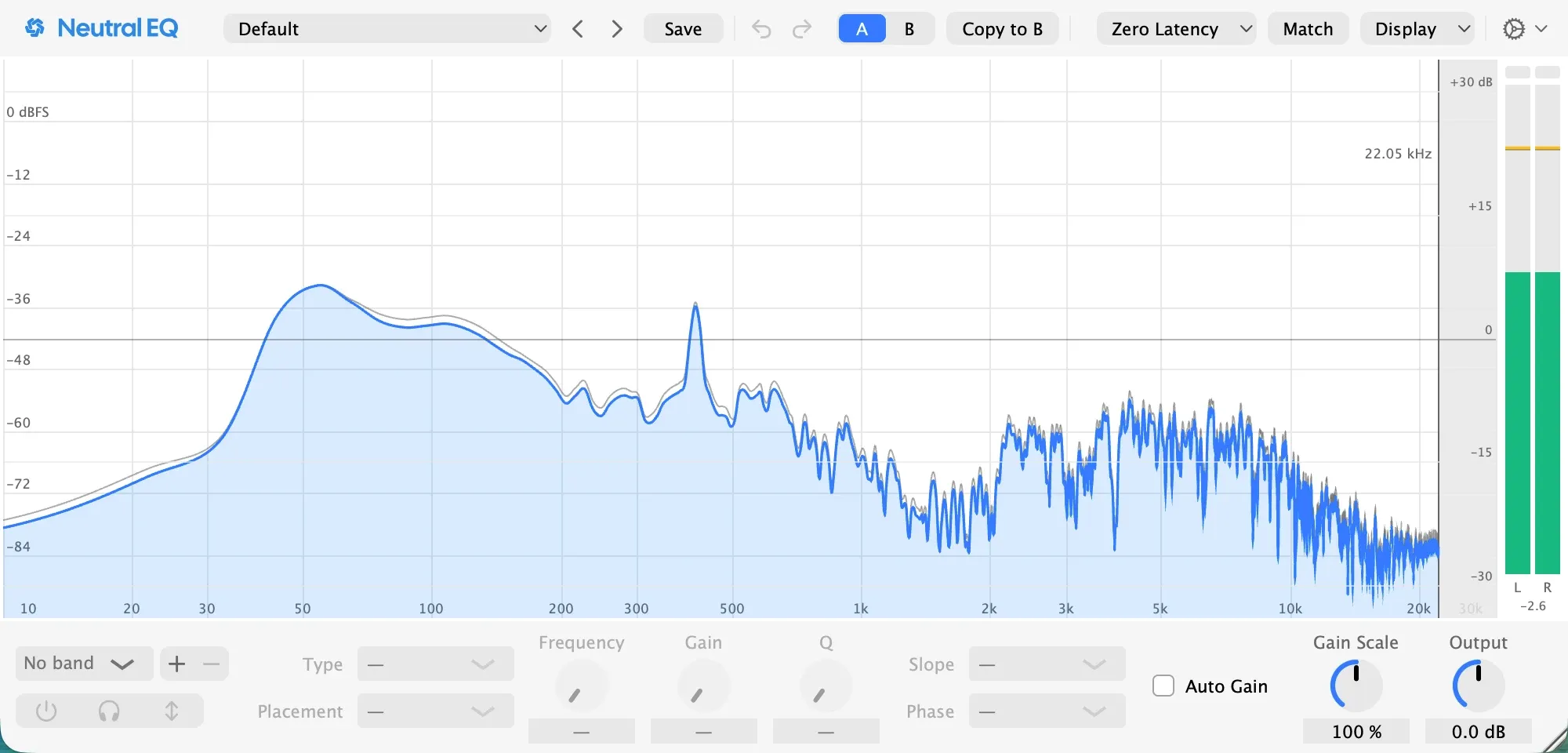
A kick has three parts, and the picture above shows all three on the analyzer. The weight is the note the kick falls to, here around 52 Hz; on an 808 it is a pitch you can tune. The ring is the shell’s resonance, or the room a sample was recorded in, between 300 and 500 Hz; it reads as a cardboard knock when it is loud, and this loop’s sits at 410 Hz. The click is the transient at the front, between 3 and 5 kHz. A phone plays none of the weight, so the box and the click are what it hears.
1. Cut below the note
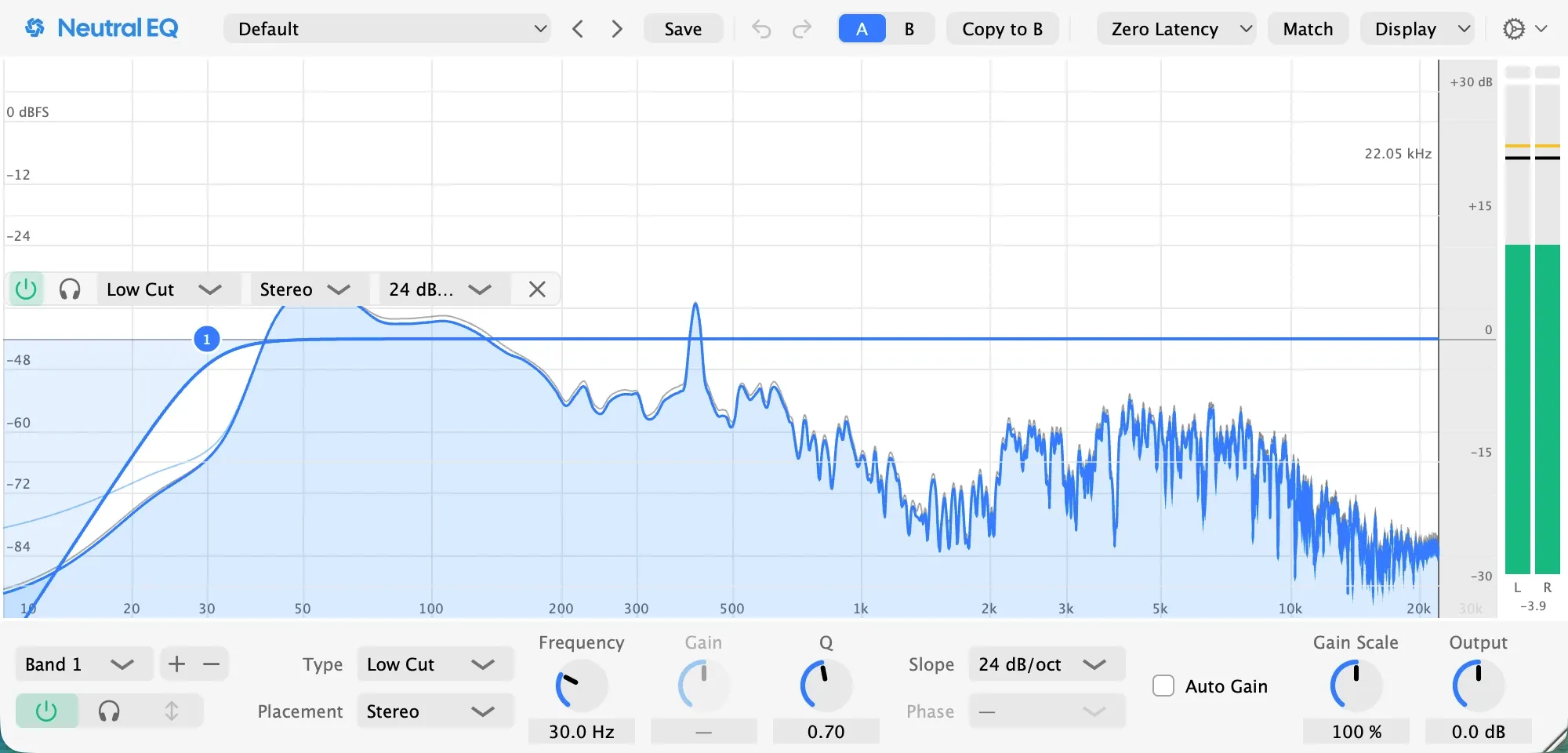
A low cut at 30 Hz, 24 dB per octave, at least an octave below the kick’s note. It removes what sits under the note: the rumble a sample carries from the room it was recorded in, or sub content no speaker plays. On this loop the cut changes nothing you can hear, and it buys headroom the moment the kick meets a limiter. On an 808 whose sub is the point, leave it off: a steep cut near the note bends the phase around it and softens the hit, and when a cut must sit that close, linear phase is the mode for it.
2. Find the ring and cut it
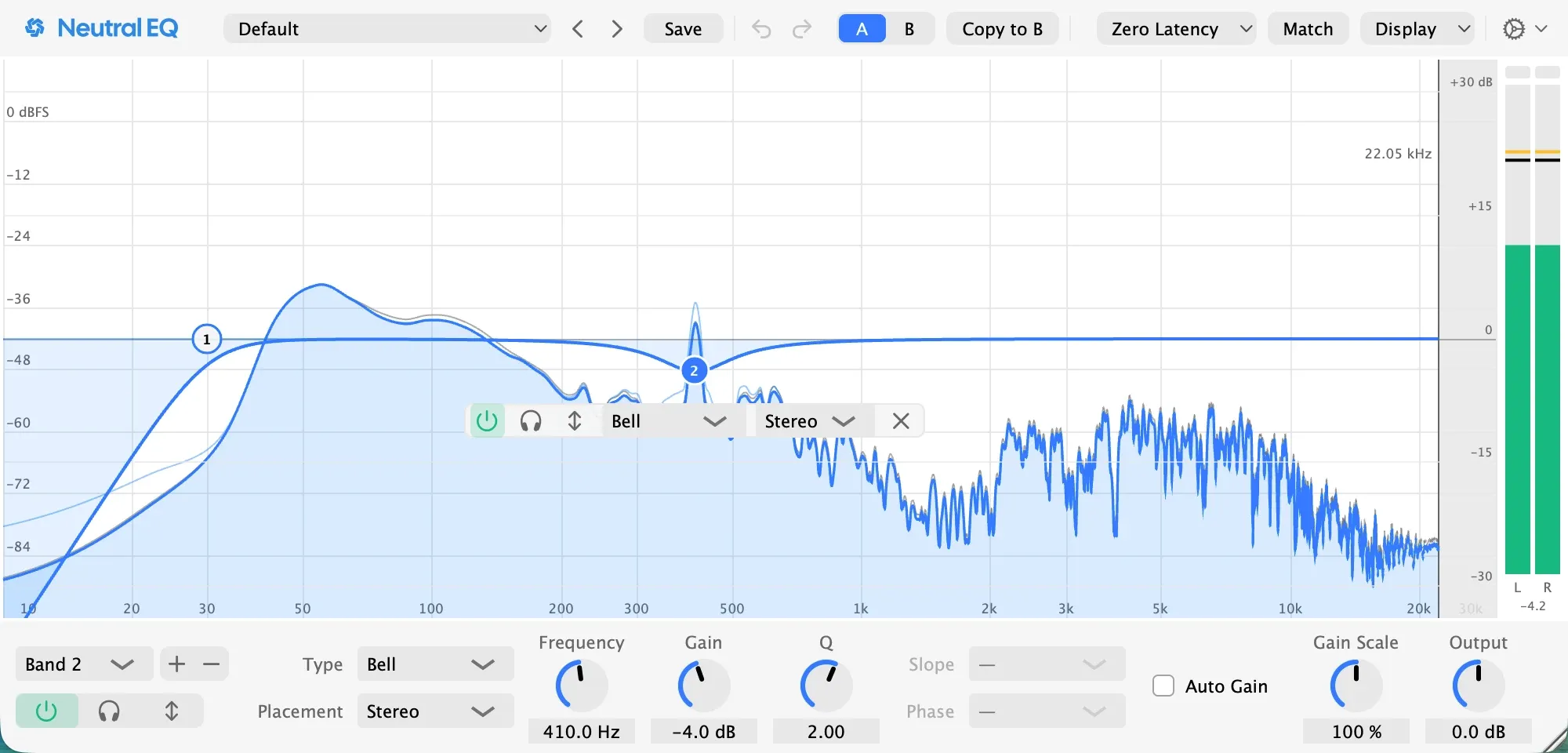
Make a narrow bell, boost it eight or ten decibels, and sweep it between 250 and 600 Hz while the loop plays. Where the knock jumps out, stop; here it was 410 Hz. Then turn the boost into a cut of three to five decibels, with a Q around 2. This is the one cut almost every kick needs, on a sample as much as on a recorded drum, and it clears the range where guitars, keys and a vocal’s body live.
Pro tip: if the knock shows only on hard hits, make the cut dynamic, so it acts on those hits and leaves the quiet ones alone.
3. Give it its weight, where the bass is not
Decide before you boost: the kick or the bass owns the lowest octave, and the other sits above it. In most electronic mixes the kick takes 50 to 70 Hz and the bass 80 to 120 Hz; some styles flip it. Here the bass plays between 73 and 110 Hz, so the kick’s weight goes at 60 Hz, a bell of two decibels with a Q of 1.
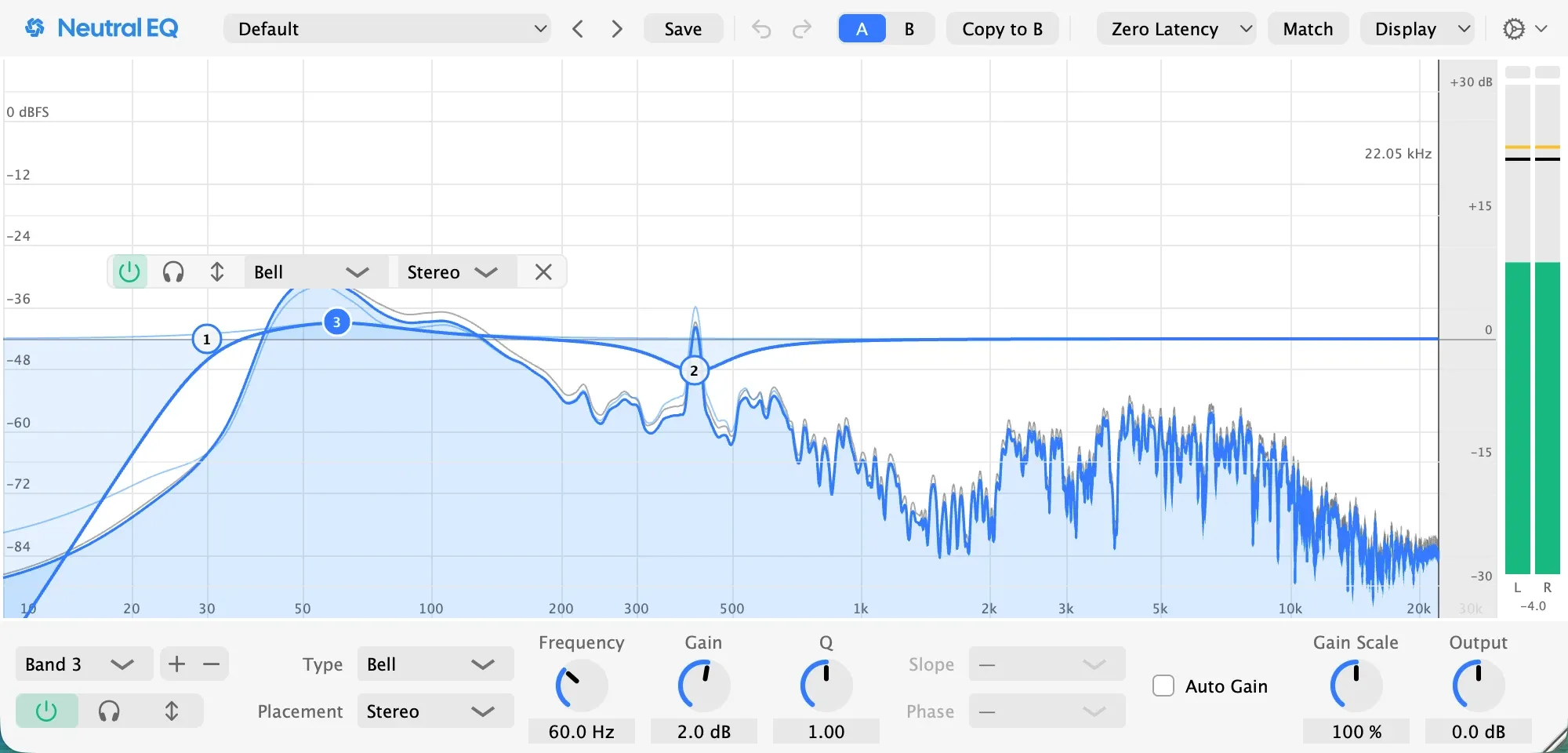
More than three decibels here usually means the sample is wrong or the bass is in the way. Fix that instead; how to EQ bass is the other half of this step.
Pro tip: when the kick and the bass fight, duck the bass on each hit first and EQ second. The Bass Kick Pocket preset is that move as a dynamic band on the bass, keyed from the kick.
4. Add the click for small speakers
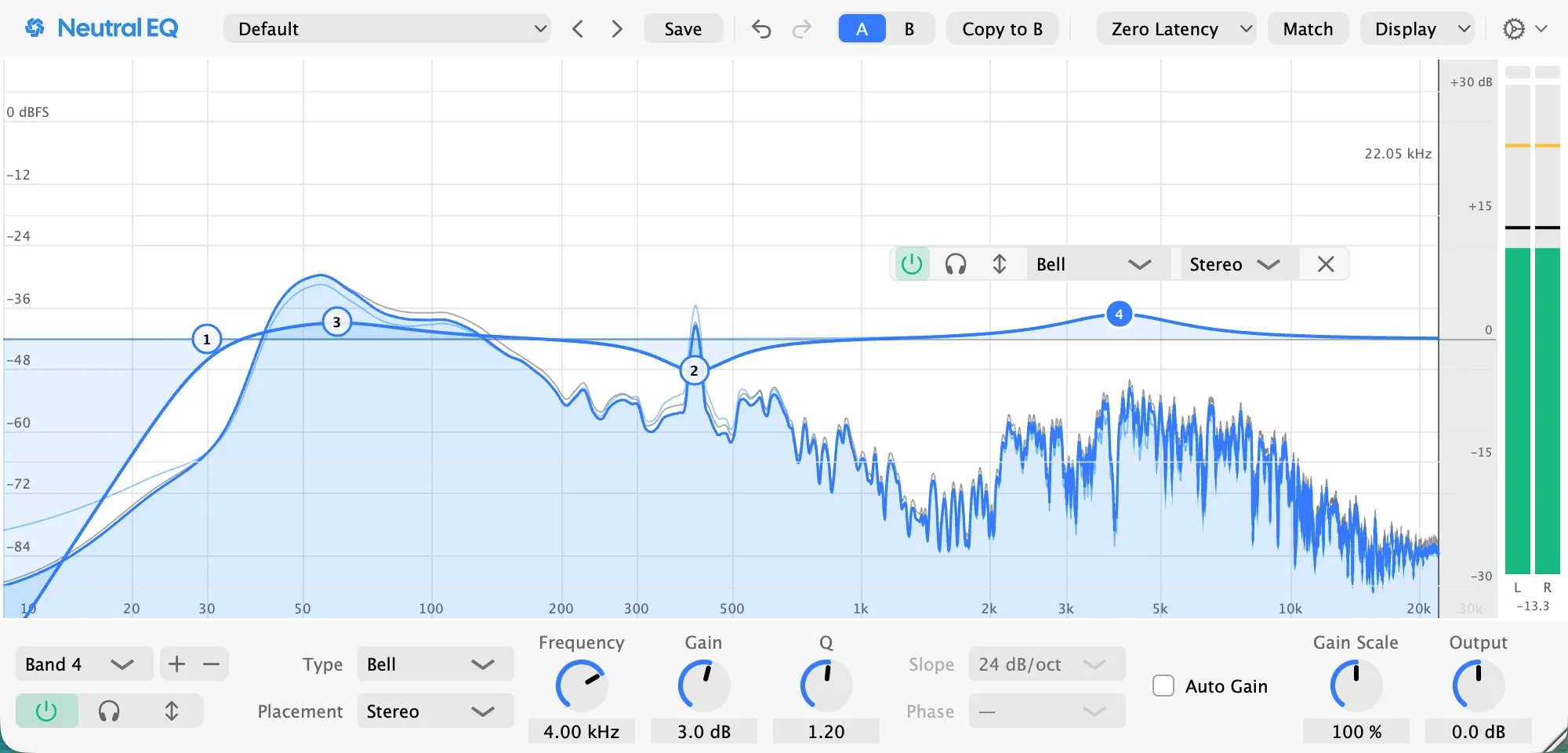
A bell of three decibels at 4 kHz, with a Q around 1.2. A phone or a laptop plays none of the weight; the click is how a listener there knows a kick happened. If the click sounds like a typewriter, the band is too narrow or too high: widen it, or move it down toward 3 kHz. On a sample with no transient at all, no boost makes one. Layer a short click sample instead.
Check it
Listen on the smallest speaker you own. If the kick vanishes, a decibel more click; if it clatters, less. Then play it with the bass again: if the two fight, go back to step 3 rather than adding bands.
Pro tip: judge every band at matched level, with Auto Gain on, and by switching the band off in the full mix rather than soloing it, because solo flatters a cut.
If the kick was recorded with a microphone
Same three places, more of the ring. A real shell in a real room puts more between 200 and 600 Hz than a sample does, so the sweep in step 2 matters more and the cut is often deeper, and the low cut in step 1 earns its keep because a kick microphone hears the room’s rumble. The rest of the kit is in how to EQ drums.
In Neutral EQ
The factory preset Kick Punch, in the Drums folder, is this page’s shape: a lift at 80 Hz, a cut at 300 Hz, a lift at 3 kHz. Load it, then drag the middle band to where your sample rings and the low band to the spot you chose against the bass. With Note Names on, the analyzer prints the kick’s note as a letter, so the kick and the bass can be set an octave or a fifth apart on purpose. The presets page lists the rest of the Drums folder.
Going further
Keep the low end mono. A sampled kick usually is; a layered or widened one is the usual leak, and a stereo sub turns to mush on a club system. The Low End Mono preset is one click.
Layer what the sample lacks. A missing sub is a sub layer and a missing click is a click layer. A boost cannot add what the sample never had.
Weight and punch are two places. The sub at 40 to 60 Hz is the note; the punch at 80 to 120 Hz is the thump a small speaker still reads, which is where Kick Punch lifts. Lift the one that is missing, not both.
Questions people ask
What frequency is a kick drum?
The sub, the kick's note, sits between 40 and 60 Hz on an 808 and between 50 and 100 Hz on most samples; the punch sits between 80 and 120 Hz; the box most people cut sits between 300 and 500 Hz; the click sits between 3 and 5 kHz. The exact note is a fact about your sample: an analyzer with note names shows it in a second.
What are good kick drum EQ settings?
There are no settings, only moves: a low cut an octave below the note, or none on an 808, a cut of three to five decibels where the sample rings, a decibel or two of weight where the bass is not, and two or three decibels of click near 4 kHz. The frequencies on this page are the ones that worked on this loop, not numbers to copy.
Should I EQ the kick or the bass?
Both, toward one decision: which of them owns the lowest octave. Put the kick's weight where the bass is not and the bass's weight where the kick is not. A cut on one is usually better than a boost on the other.
Related pages
Made in Neutral EQ on a session built for this page: a drum machine kick and a bass line in Neutral Tracks, the EQ on the kick. Every picture is the plugin as it was set for that step.