EQ
How to EQ a snare
A snare has four parts: a thump under 100 Hz many samples carry, the body between 150 and 250 Hz, a ring between 400 Hz and 1 kHz, and the crack between 2 and 5 kHz. Cut the thump, find the ring with a sweep and cut it narrow, lift the body a touch, and lift the crack so a phone hears the hit.
Pick the sample before you touch the EQ
In a digital session the snare is a sample or a layer of two, and the fastest EQ move is a different sample. If the snare is thin, one with more body beats a boost; if it rings, a drier one beats a cut. Spend the thirty seconds in the browser first, and EQ what is left.
What you are hearing
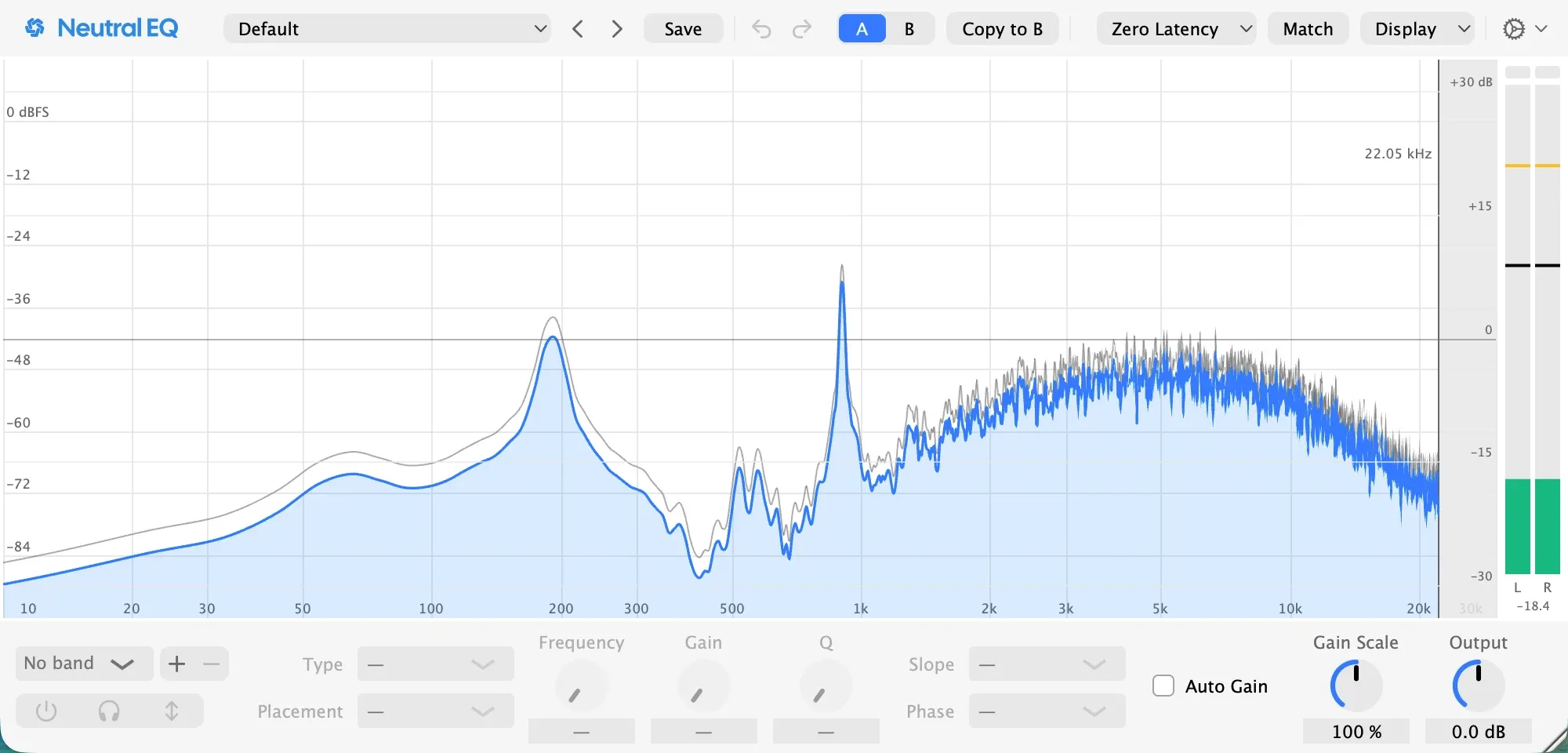
A snare has four parts, and the picture above shows them on this session’s sample. The thump under 100 Hz is what many samples carry from the kick bleed or the room they were cut in; it is never the snare. The body is 150 to 250 Hz, here near 190 Hz, the weight of the hit. The ring is 400 Hz to 1 kHz, here at 900 Hz, the note the shell sings after the hit. The crack is 2 to 5 kHz, the snap that reads on a phone, and the wires and the air are above 8 kHz.
1. Cut the thump
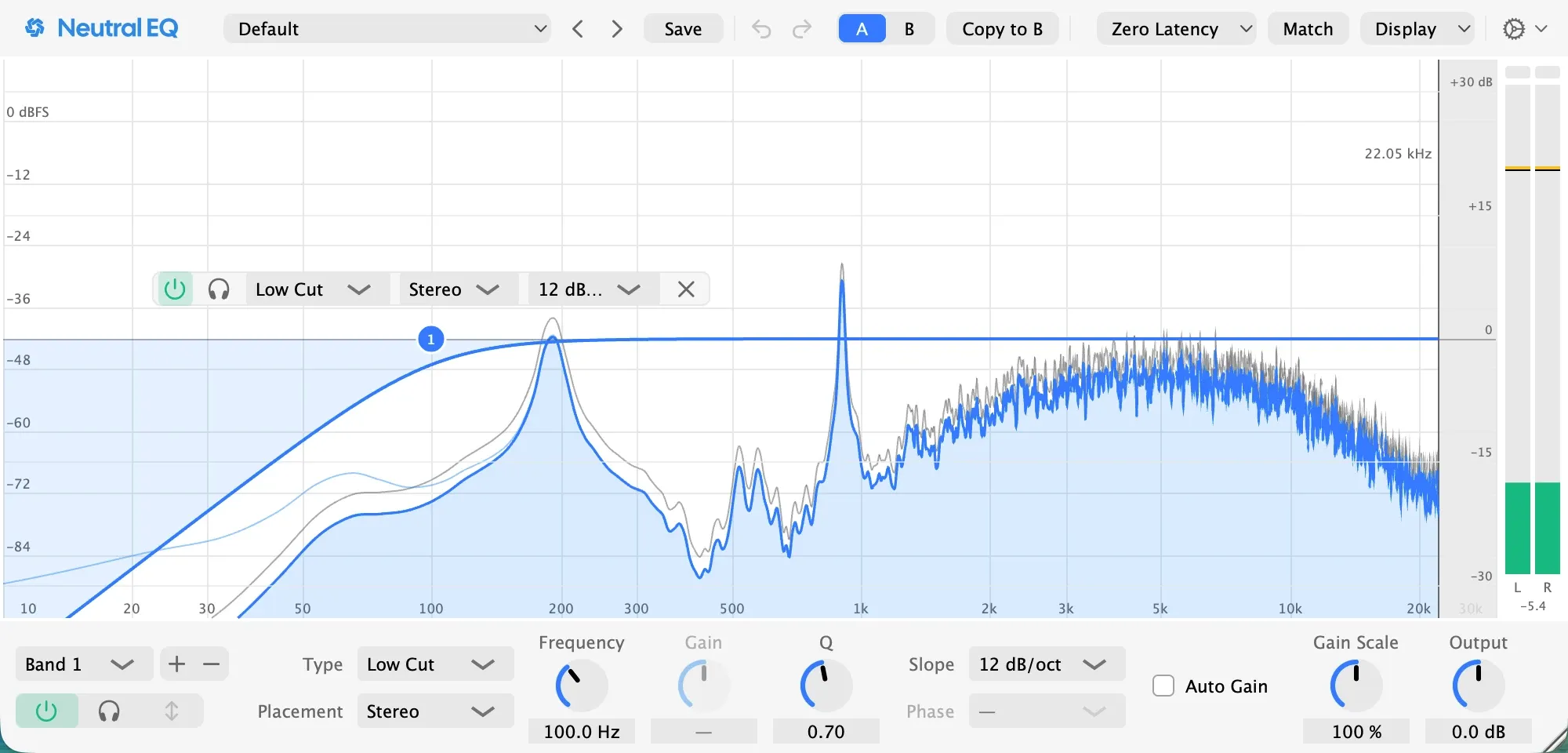
A low cut at 100 Hz with a gentle 12 dB per octave slope removes what the sample brought along under the hit and leaves the body whole. It also keeps the snare out of the kick’s range, which is the point of giving each drum its own page.
2. Find the ring and cut it narrow
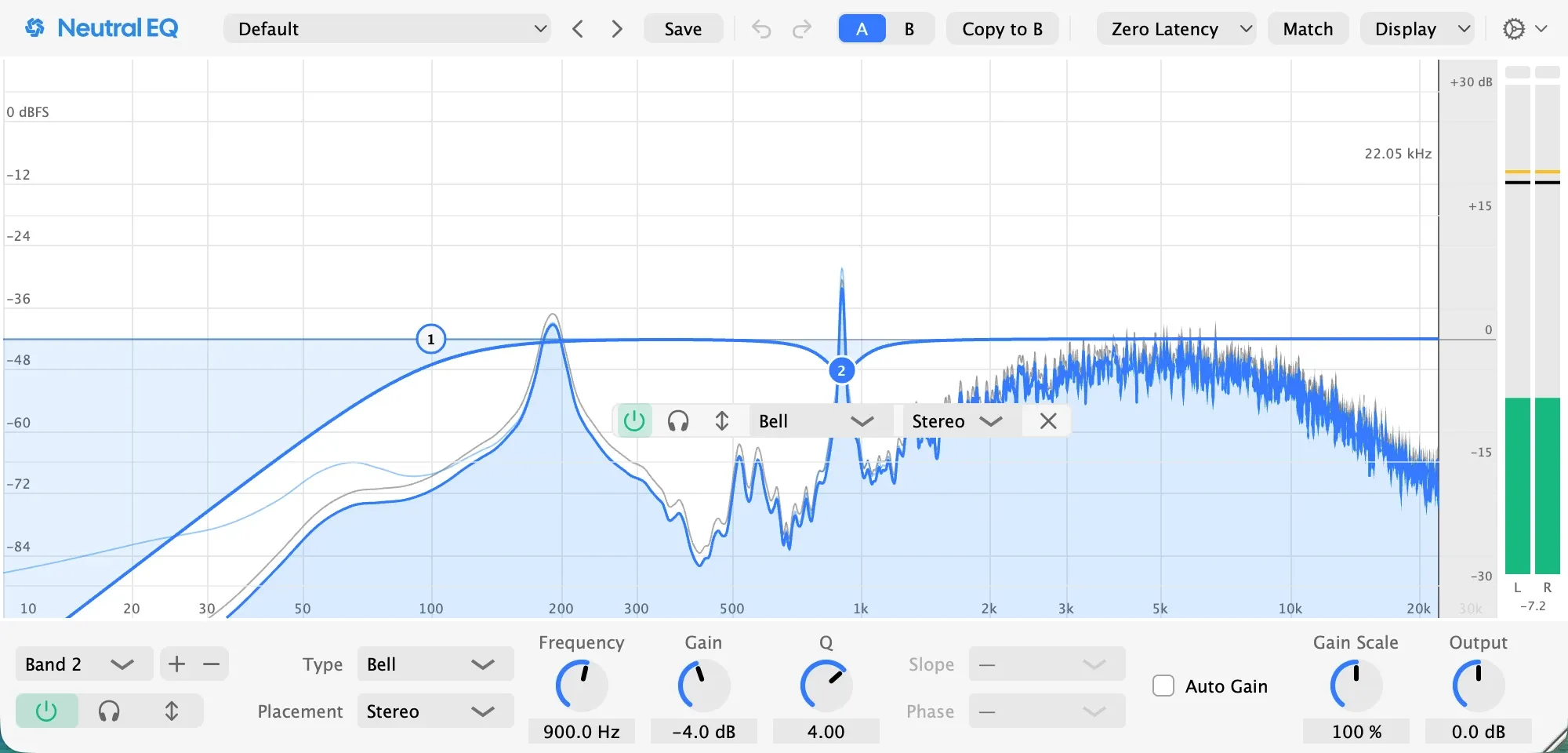
Make a narrow bell, boost it eight decibels, and sweep it between 400 Hz and 1 kHz while the beat plays. The ring jumps out; on this session it jumped out at 900 Hz. Then turn the boost into a cut of three to six decibels, here four with a Q of 4, and keep it narrow, because a wide cut here takes the body with the ring.
Pro tip: if the ring shows only on hard hits, make the cut dynamic, so the quiet hits keep their tone.
3. Lift the body a touch
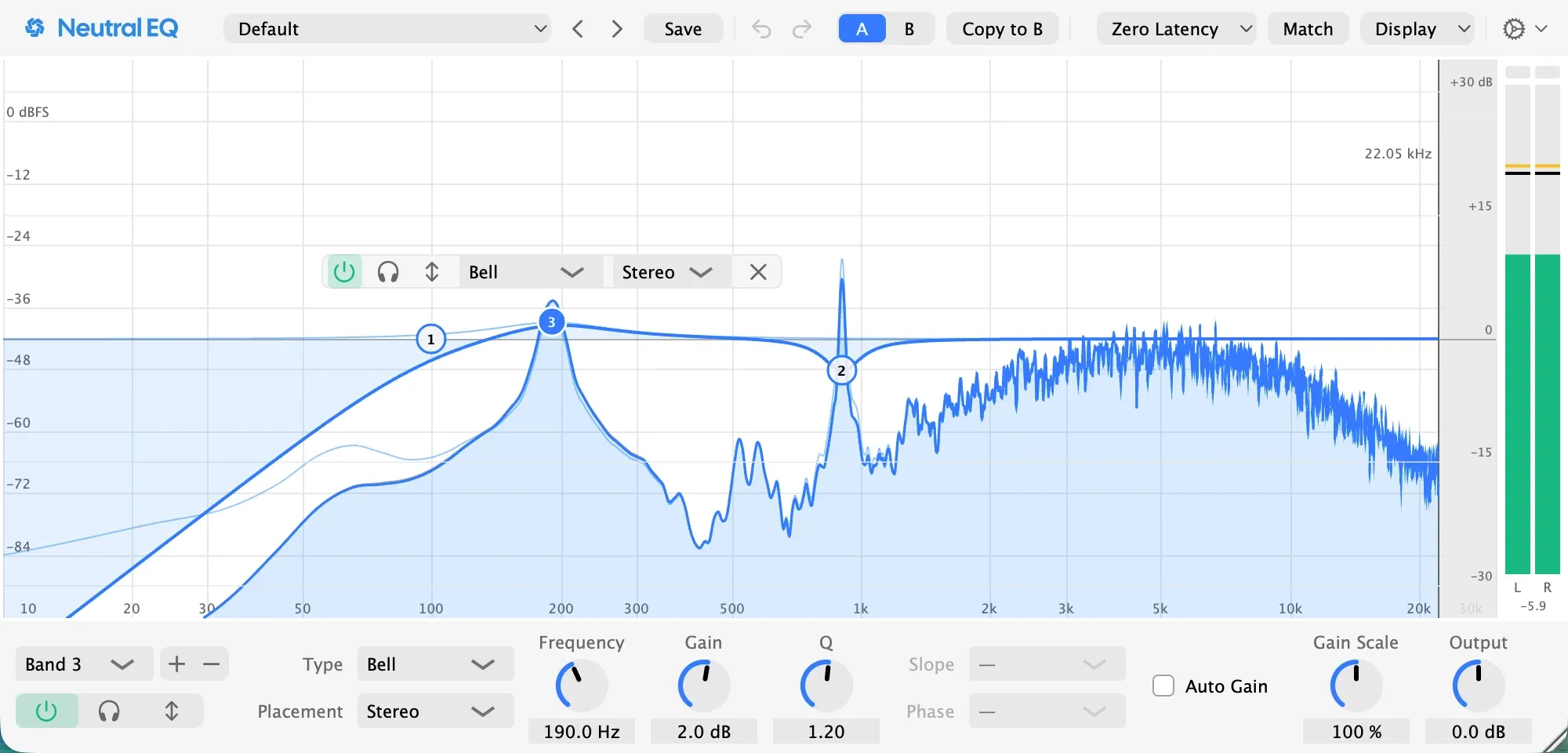
A lift of a decibel or two near 200 Hz, here two at 190 Hz with a Q of 1.2, gives the hit its weight back after the cuts. More than three decibels here is the sign of a thin sample, and in a digital session the fix is a second sample layered under it, never a bigger band.
4. Lift the crack
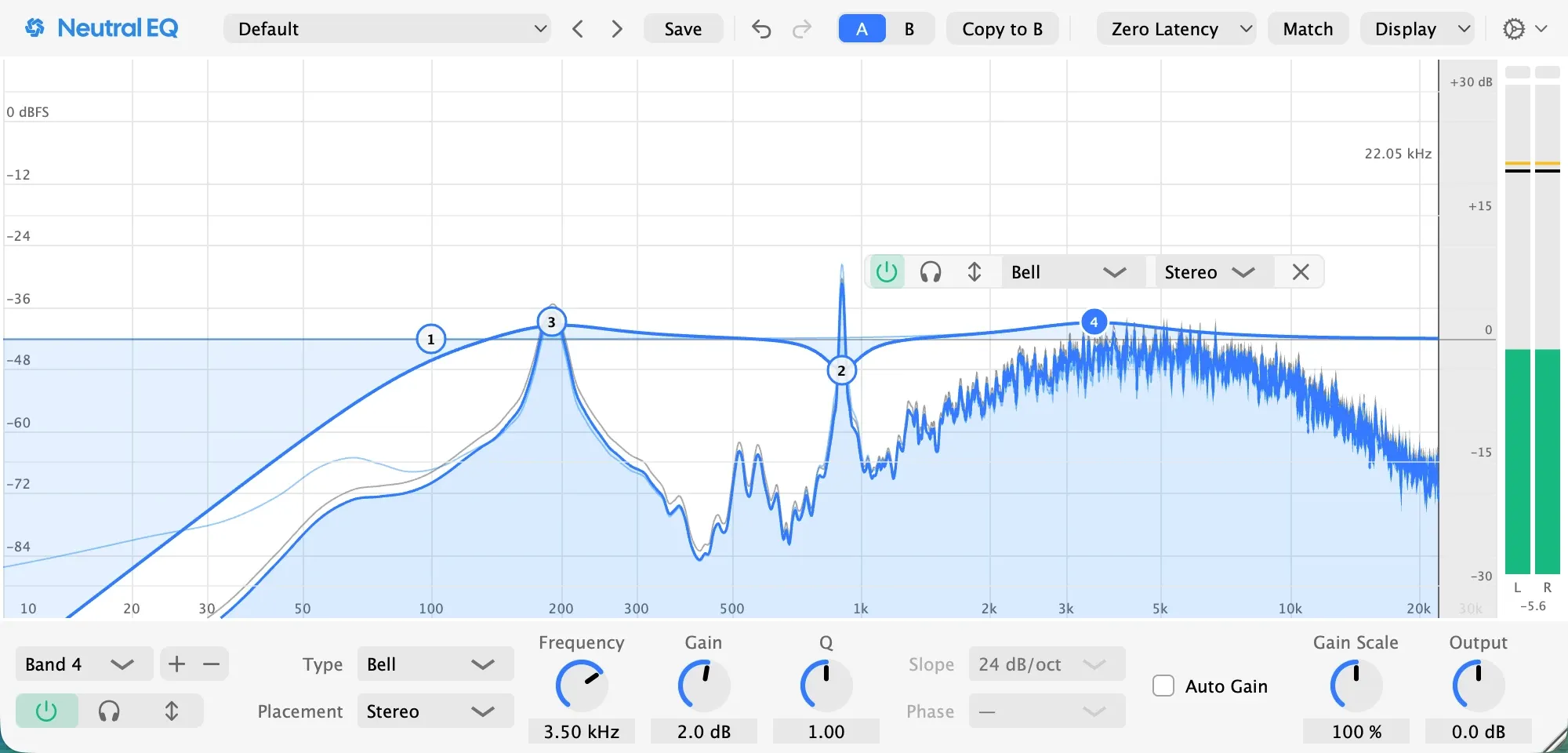
A phone plays none of the body. What it plays is the crack, so a lift of a decibel or two between 2 and 5 kHz, here two at 3.5 kHz with a Q of 1, is how a listener there hears the hit at all. If the snare starts to sound like a slap, the lift is too high or too much.
Check it
Listen on the smallest speaker you own: the hit should be there without the body. Then play it with the kick: the two should take turns, the kick low and the snare above it. If the snare sounds like cardboard, go back to step 2 rather than adding bands.
Pro tip: judge at matched level, with Auto Gain on, and by switching the band off in the full mix rather than soloing it.
If the snare was recorded with microphones
Same four moves, with the bleed added. The top microphone hears the hats and the kick, so the low cut in step 1 earns its keep and a high cut near 10 kHz on the bottom microphone takes the hats out of the wires. A real shell rings more than a sample, and the sweep in step 2 often finds two rings an octave apart.
In Neutral EQ
The Drums folder holds this page’s starting points: Snare Body is step 3, and Snare Ring Tamer is step 2, a narrow cut to drag onto the ring the sweep finds. Load one, and the analyzer shows each hit under the curve, with Note Names on printing the ring as a note. The presets page lists the folder.
Going further
The snare and the vocal share the crack. Both live between 2 and 5 kHz; when a singer is in the song, lift the snare’s crack a little lower, near 2.5 kHz, or let the vocal have the range and the snare the body.
Layer rather than boost. A snare that needs more than a decibel or two of body or crack is the wrong sample; a second sample layered under it, a body or a clap, gives what a band cannot.
Tune the ring instead of cutting it. A sampled snare’s ring is a pitch; a sample whose ring sits in the song’s key reads as part of the music, and the cut gets smaller.
Questions people ask
What frequency is a snare drum?
The body sits between 150 and 250 Hz, the ring between 400 Hz and 1 kHz, and the crack between 2 and 5 kHz; the wires and the air are above 8 kHz. Which exact ring a snare has is a fact about the sample or the drum, and a sweep finds it in seconds.
What are good snare EQ settings?
There are no settings, only moves: a low cut near 100 Hz, a narrow cut of three to six decibels where the sweep finds the ring, a lift of a decibel or two on the body near 200 Hz, and a lift of a decibel or two on the crack near 3 or 4 kHz. The numbers on this page are the ones that worked on this session.
Why does my snare ring?
Every snare rings somewhere between 400 Hz and 1 kHz; a sample carries the ring its drum had and a recorded snare adds its room. Find it with a narrow boost swept across that range, cut it narrow, and if it rings only on hard hits, make the cut dynamic so the quiet hits keep their tone.
Related pages
Made in Neutral EQ on a session built for this page: a drum machine beat with the snare on its own track, and a synth bass, in Neutral Tracks, the EQ on the snare. Every picture is the plugin as it was set for that step.